Sign what you already have
Start a request from the library, a tenant’s or property’s documents, a new upload, or a document you’re making from a template.
 UnitConnect
E-signature
Request a signature on a lease you just made from a template, a PDF or Word file you upload, or any document already in UnitConnect. Tenants, guarantors and owners sign online, and the signed copy lands on the tenant’s record with its certificate.
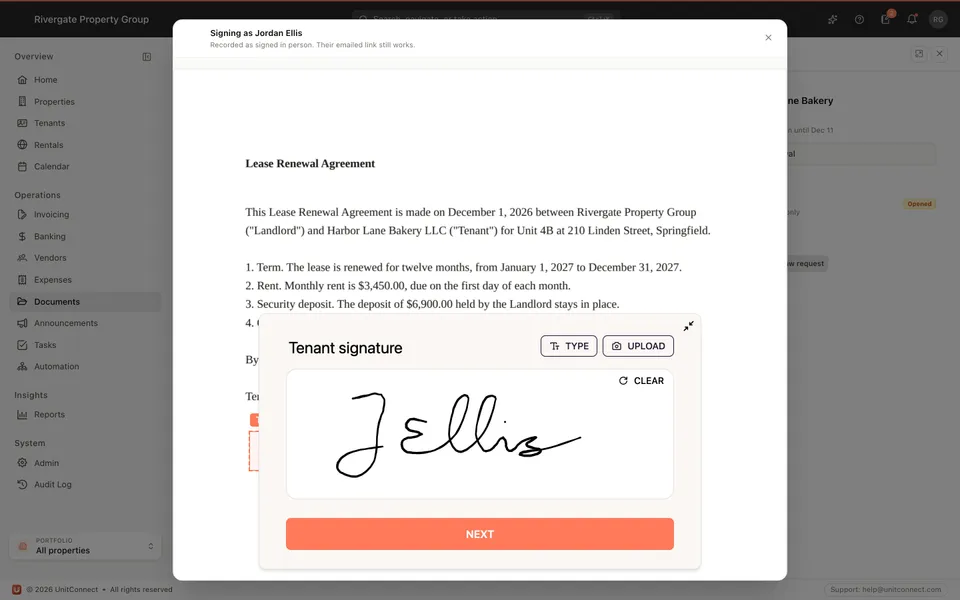
Built in
There’s no separate signing service to buy or keep in step. Signers come from the lease, each one confirms who they are, and you see where every request stands.
What you get
Start a request from the library, a tenant’s or property’s documents, a new upload, or a document you’re making from a template.
Send the PDF or Word document you already use. A Word document is signed as a PDF made from it, and the Word file stays as it is.
See who has opened, signed or declined each request, with its full activity trail.
Reminders go out on a schedule until everyone has signed, requests expire on the date you set, and the ones that stall show up on your documents home.
Correct a signer’s name or email and a new link goes out. Withdraw a request, or send it again after it was declined or expired.
The signed copy and its signing certificate are saved to the tenant and emailed to everyone. The unsigned original steps aside, and only an administrator can delete a signed copy.
How it runs
Upload it, choose it from the library, or make it from a template. Add more documents to send them together.
Tenants and guarantors come from the lease. Place where each person signs, set reminders and an expiry date, and send.
When the last person signs, the signed copy and certificate are on the tenant’s record, and everyone has a copy by email.
No. They sign from the emailed link. Tenants who use the portal can also sign there.
Each signer confirms with a one-time code by email or text, and every request gets a signing certificate with the full activity trail.
Yes. Open the request and have the person sign on your screen. Their emailed link still works.
It’s archived and linked to the signed copy, so your lists show only the signed one. You can restore it.
Eviction and termination notices, notices of default or to cure, HOA votes and ballots, deeds, powers of attorney and notarized documents. Those are served or signed on paper.
E-signature is an add-on, with signed documents included each month. Documents, templates and storage are part of every plan. Talk to us for pricing.
Keep going
Leases and notices from your own templates, filled in from the record, and every file in one library.
Learn moreOnline rent, documents, lease summary, and maintenance requests without a separate tenant stack.
Learn moreOne shortcut finds any tenant, property, vendor or invoice — and takes you straight there.
Learn moreEvery invoice that arrives becomes visible work, and leaves only when somebody resolves it.
Learn more7-day free trial of the full product. Card required, no charge until the trial ends. Cancel anytime.
Prefer a walkthrough? Schedule a demo