A library for the whole portfolio
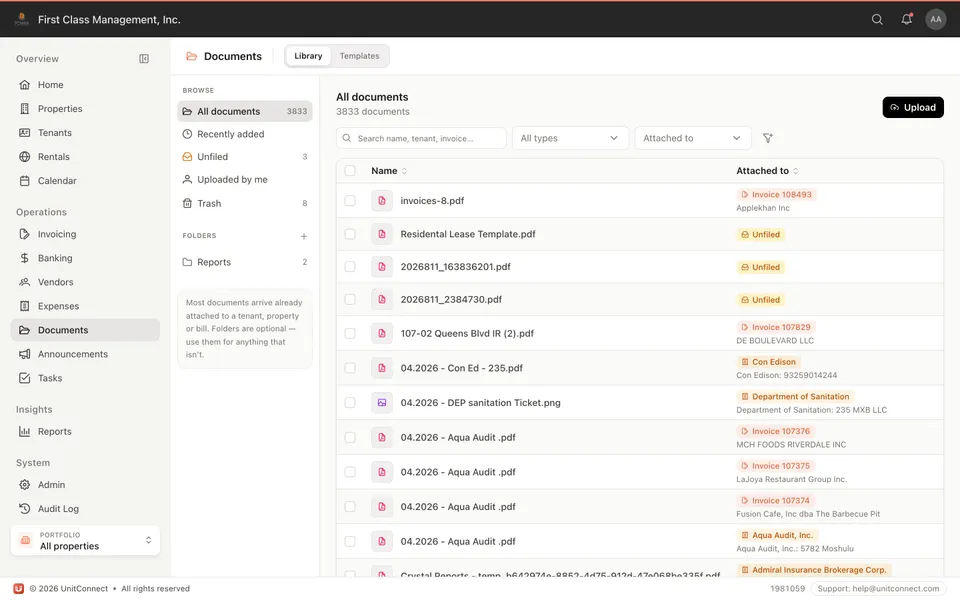
Find a document without opening the tenant, the bill, and the vendor in turn. Filter and search across what you have already stored.
 UnitConnect
Documents hub
Leases, invoices, and backup live in a Documents workspace. Search, preview, and upload from one screen. Attach a file to a property, tenant, bill, or vendor so the next person is not hunting email.
What you get
Find a document without opening the tenant, the bill, and the vendor in turn. Filter and search across what you have already stored.
The same file can hang off a property, a lease, an invoice, or a vendor bill — the hub is the index, not a second filing cabinet.
Build document templates with merge fields so landlord, tenant, and property details fill in instead of another copy-paste.
Unlimited storage is included. Backup on a bill and the lease PDF are not a paid add-on.
How it runs
Drop the PDF or image into the hub, or attach it while you are already on the tenant, bill, or vendor.
Property, tenant, invoice, expense, vendor — so anyone who opens that record sees the file.
Search and preview from Documents. December-you is not asking the office for last year’s insurance binder.
FAQ
Plans include unlimited storage for invoices, leases, and backup. You keep access for recordkeeping.
Yes, the files you choose to share in the tenant portal — not the entire hub.
Yes. Those attachments are the same documents. The hub is how you find them without opening every record.
Keep going
One shortcut finds any tenant, property, vendor or invoice — and takes you straight there.
Learn moreEvery invoice that arrives becomes visible work, and leaves only when somebody resolves it.
Learn moreReads the vendor, amount and dates off the invoice, and splits a batch scan into one item each.
Learn moreTrack CAM, taxes, and insurance against what you collected — then invoice the shortage or credit the overage.
Learn more7-day free trial of the full product. Card required, no charge until the trial ends. Cancel anytime.