Portal in, office list
There is no conversion step. The request the tenant opened is the task on your list — unassigned until you pick it up.
 UnitConnect
Work requests
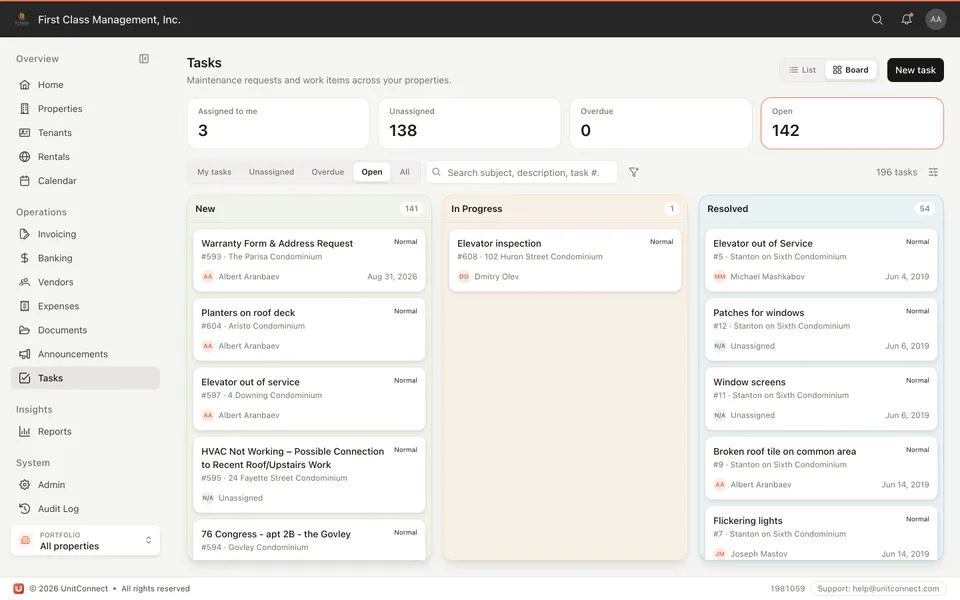
Maintenance requests and other work items live in one workspace. A tenant submits from the portal — it lands as a task you assign, update, and close. List or board, without a separate ticketing product.
What you get
There is no conversion step. The request the tenant opened is the task on your list — unassigned until you pick it up.
New, in progress, resolved. Priority and category so the leak and the “general inquiry” are not the same pile.
Work the queue as a table, or move cards across a board. Same filters either way.
Updates and attachments live on the work item. Tenants who submitted in the portal see the status instead of calling for it.
How it runs
Tenant portal, or you add a work item yourself. Either way it is on Tasks.
Assign a person, set a due date, move status. The building does not wait on an inbox.
Resolved stays on the property’s history — not a text thread you cannot search next year.
FAQ
Maintenance requests are the usual path. You can also track general work items for the office.
No. They see the request they submitted, and the updates you share. Your Tasks workspace is for the team.
No. Work requests are included on every plan, with the tenant portal.
Keep going
One shortcut finds any tenant, property, vendor or invoice — and takes you straight there.
Learn moreEvery invoice that arrives becomes visible work, and leaves only when somebody resolves it.
Learn moreReads the vendor, amount and dates off the invoice, and splits a batch scan into one item each.
Learn moreTrack CAM, taxes, and insurance against what you collected — then invoice the shortage or credit the overage.
Learn more7-day free trial of the full product. Card required, no charge until the trial ends. Cancel anytime.