Budget once, copy next year
Build the property operating budget at the start of the year. Copy from the prior year when the shape has not changed.
 UnitConnect
Budgets & reports
Set an operating budget, track CAM, taxes, and insurance against it, and export the reports owners and lenders ask for — rent roll, NOI, collections, expense vs budget.
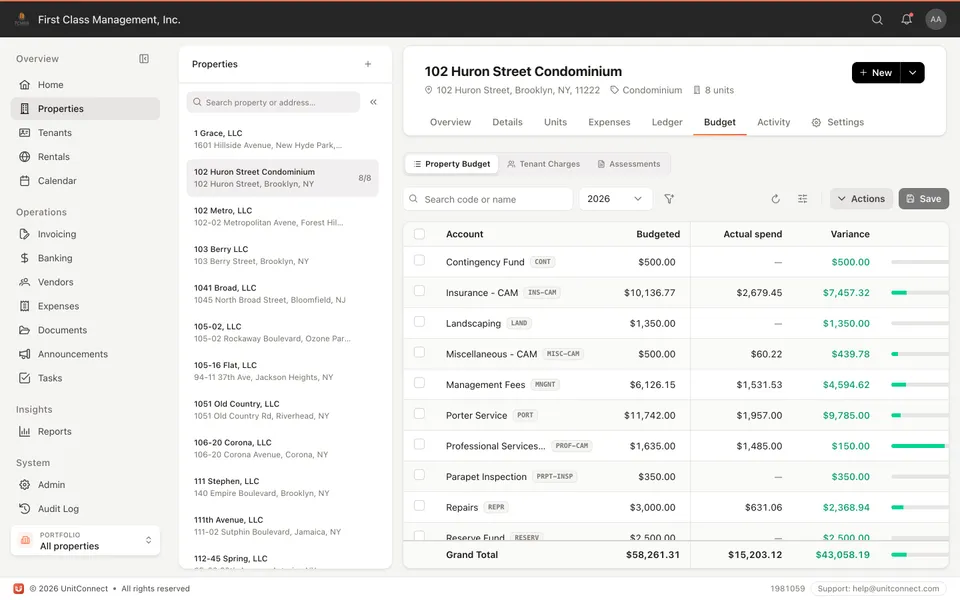
What you get
Build the property operating budget at the start of the year. Copy from the prior year when the shape has not changed.
Monthly CAM contributions can follow the budget so tenants are billed their share of CAM, taxes, and insurance before year-end reconciliation.
Expenses and pass-throughs you already enter feed the same reports. Attachments stay on the bill as backup.
Rent roll, net operating income, income/expense, annual collections, expense vs budget, and CAM reconciliation — PDF or Excel.
How it runs
Operating expenses, taxes, insurance. Copy last year if the building has not changed.
Tenants pay estimated CAM with rent. Actuals land as you enter bills.
Run the pack for owners or lenders. CAM reconciliation uses the same numbers.
FAQ
Any operating expense — repairs, maintenance, real estate taxes, insurance. If the lease calls for reimbursement, tenants can be billed their share.
A budget is still useful for you. If the lease does not call for reimbursement, you skip CAM charges for that tenant.
You do it once. When the next year looks the same, copy from the prior year.
Income/expense, rent roll, tenant profile, budget vs expense, CAM reconciliation, and more — PDF or Excel. Every plan includes reports.
Keep going
One shortcut finds any tenant, property, vendor or invoice — and takes you straight there.
Learn moreEvery invoice that arrives becomes visible work, and leaves only when somebody resolves it.
Learn moreReads the vendor, amount and dates off the invoice, and splits a batch scan into one item each.
Learn moreTrack CAM, taxes, and insurance against what you collected — then invoice the shortage or credit the overage.
Learn more7-day free trial of the full product. Card required, no charge until the trial ends. Cancel anytime.