Target the properties that need it
All properties, or the buildings where the notice applies. You are not blasting every tenant in the portfolio for a roof on one lot.
 UnitConnect
Building notices
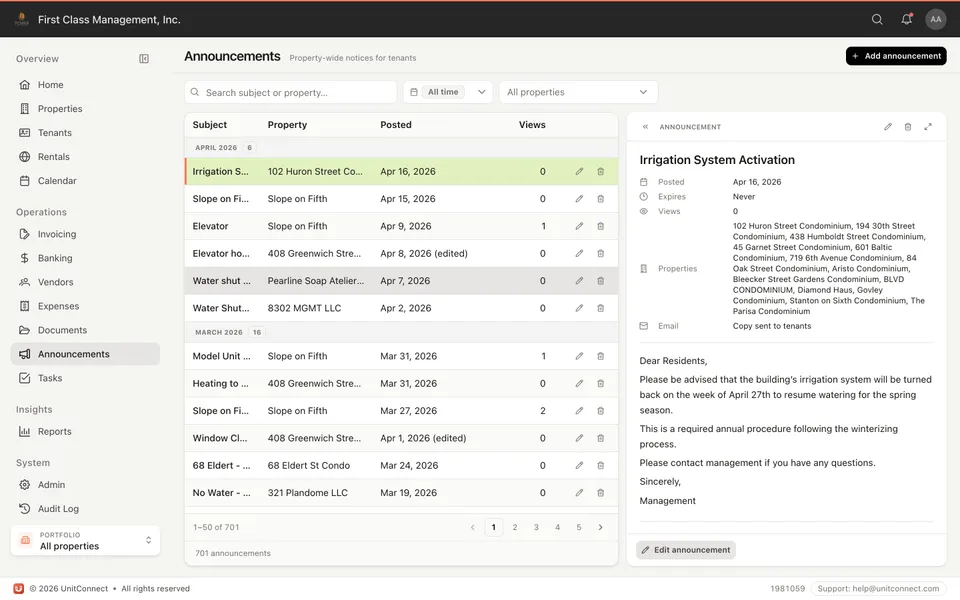
Write a notice, pick the properties, and tenants see it in the portal. Email the bill-to addresses when you want a copy in their inbox. Set an expiration so last winter’s boiler notice is not still on the wall.
What you get
All properties, or the buildings where the notice applies. You are not blasting every tenant in the portfolio for a roof on one lot.
The announcement shows in the tenant portal. Send email to bill-to contacts when the notice should also land in their inbox.
Rich text and attachments — hours, a PDF, a vendor contact — so the notice is the whole message.
Never, or after a date. Expired notices drop off instead of cluttering the portal.
How it runs
Subject, body, optional attachment. Same tone you would post in the lobby.
One property or the whole portfolio. Tenants on those properties see it.
Portal for tenants, your announcements list for the office — not a buried email thread.
FAQ
The notice is in the portal. You can also email bill-to addresses so people who do not log in still get it.
Yes. A PDF of hours, a form, or a vendor notice travels with the announcement.
Yes. Announcements are part of the product, not a messaging add-on.
Keep going
One shortcut finds any tenant, property, vendor or invoice — and takes you straight there.
Learn moreEvery invoice that arrives becomes visible work, and leaves only when somebody resolves it.
Learn moreReads the vendor, amount and dates off the invoice, and splits a batch scan into one item each.
Learn moreTrack CAM, taxes, and insurance against what you collected — then invoice the shortage or credit the overage.
Learn more7-day free trial of the full product. Card required, no charge until the trial ends. Cancel anytime.