Nothing leaves silently
Every item ends in a state you can point at: expense created, duplicate, not an invoice, or rejected. None of those is deletion, and none of them is a blank.
 UnitConnect
Accounts payable
Capture is the control. The moment an invoice lands it becomes visible work with somebody owing it an answer — and it leaves only as an expense, a duplicate, not an invoice, or rejected. Paying on sight to avoid losing track stops being the system.
What you get
Every item ends in a state you can point at: expense created, duplicate, not an invoice, or rejected. None of those is deletion, and none of them is a blank.
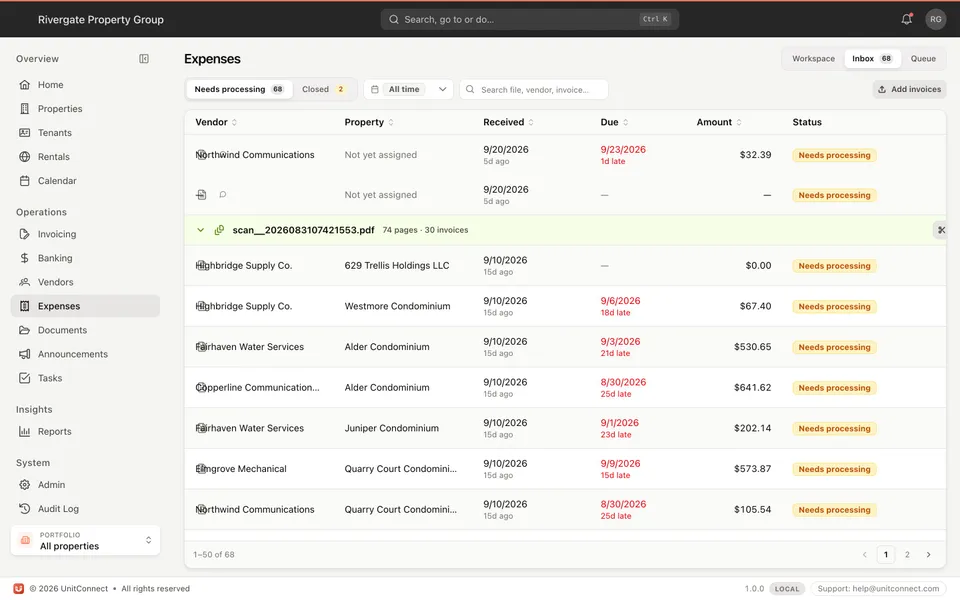
Scan the day’s post in a single pass. One file is not assumed to be one invoice — a 74-page scan becomes the invoices inside it, each its own item.
Unpaid and paid, overdue and due soon, who owns it, and the next action on each row. Late items carry how late they are.
A rejected invoice stays visible with the reason attached, so the conversation with the vendor has something behind it.
How it runs
Upload a scan or a single invoice. It is captured immediately and counted as work from that second.
Confirm it into an expense, or mark it duplicate, not an invoice, or rejected with a reason.
Resolved expenses land in the queue with owner, due date and next action, so nothing waits on someone remembering it.
FAQ
Mark it “not an invoice”. It leaves the inbox without being deleted, so the record of it arriving is still there.
Yes. That is the expected way to use it. One uploaded file is split into the invoices it contains, each becoming its own item to resolve.
No — it feeds it. The inbox is where invoices wait to be resolved; confirmed ones become ordinary expenses with the invoice attached.
Keep going
One shortcut finds any tenant, property, vendor or invoice — and takes you straight there.
Learn moreReads the vendor, amount and dates off the invoice, and splits a batch scan into one item each.
Learn moreTrack CAM, taxes, and insurance against what you collected — then invoice the shortage or credit the overage.
Learn moreOnline rent, documents, lease summary, and maintenance requests without a separate tenant stack.
Learn more7-day free trial of the full product. Card required, no charge until the trial ends. Cancel anytime.